TexSlide relies on the local LaTeX engine. Please select and install the appropriate LaTeX distribution for your operating system.
Select Distribution
LaTeX distributions come in various options, primarily divided into two categories: full-featured complete distributions and lightweight minimal distributions.
| OS | Distribution | Size | Key Features |
|---|---|---|---|
| macOS | MacTeX | ~4.5 GB | The standard distribution for macOS. Feature-complete with full ecosystem support, ready to use out-of-the-box. |
| BasicTeX | ~100 MB | Minimalist version with core components only. Requires manual package installation. | |
| Linux | TeX Live | ~4-8 GB | The standard community distribution. Complete ecosystem, managed through system package managers. |
| Windows | MiKTeX | ~200 MB | Standard choice for Windows. Small initial size, on-demand package installation with automatic downloads. |
| TeX Live | ~4.5 GB | Complete functionality, works offline. Full local environment without requiring internet connection. |
Download & Installation
macOS
macOS
MacTeX
- Visit MacTeX Download Page and download the
MacTeX.pkginstaller. - Run the installer and follow the graphical setup wizard.
- Ready to use after installation - no additional configuration needed.
BasicTeX
- Visit BasicTeX Download Page and download the
BasicTeX.pkginstaller. - Run the installer and follow the graphical setup wizard.
- Install additional packages as needed using:
sudo tlmgr install <package-name>Verify Installation
After installation, open a terminal and run the following commands to verify successful installation:
latex --version
pdflatex --version
xelatex --version
Environment Testing
To ensure TexSlide works properly, please run the following tests locally to confirm your LaTeX distribution and core packages (including multilingual support) are correctly installed and available.
Create a new file test.tex with the following content:
\documentclass[border=10pt]{standalone}
\usepackage{amsmath}
\usepackage{amssymb}
\usepackage{ifxetex}

\ifxetex
    \usepackage{xeCJK}
    \newcommand{\testtext}{Test CJK}
    \newcommand{\enginestatus}{This is XeLaTeX}
\else
    \newcommand{\testtext}{No CJK support}
    \newcommand{\enginestatus}{This is pdfLaTeX}
\fi

\begin{document}
\centering
\begin{tabular}{ll}
    \textbf{Package} & \textbf{Demonstration} \\
    \hline
    \texttt{amsmath} & $\displaystyle \sum_{n=1}^{\infty} \frac{1}{n^2} = \frac{\pi^2}{6}$ \\
    \texttt{amssymb} & $\mathbb{R}, \mathbb{C}, \mathbb{N}, \exists, \forall, \infty$ \\
    \texttt{ifxetex} & \enginestatus \\
    \ifxetex \texttt{xeCJK} & \testtext \fi
\end{tabular}
\end{document}
Execute the following commands to compile and check the generated test.pdf file content.
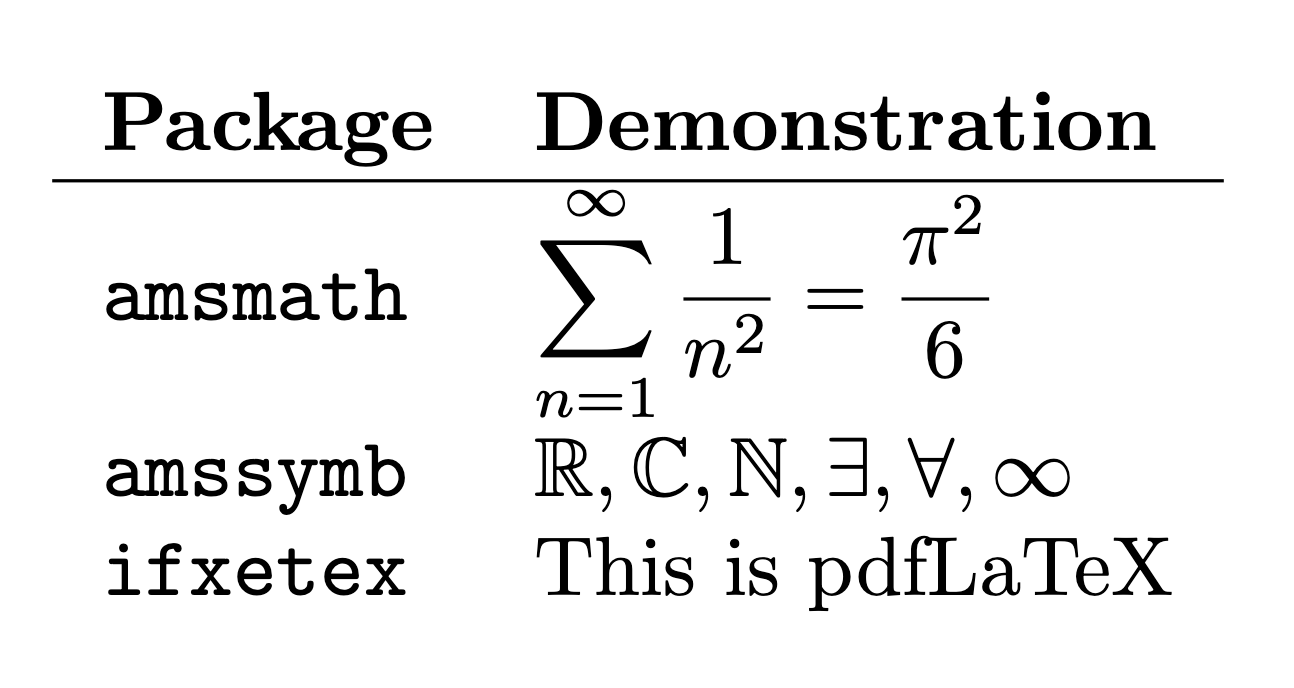
- Using pdfLaTeX engine:
pdflatex test.texThe generated test.pdf should display the following content:
- Using XeLaTeX engine (with multilingual support):
xelatex test.texThe generated test.pdf should display the following content:
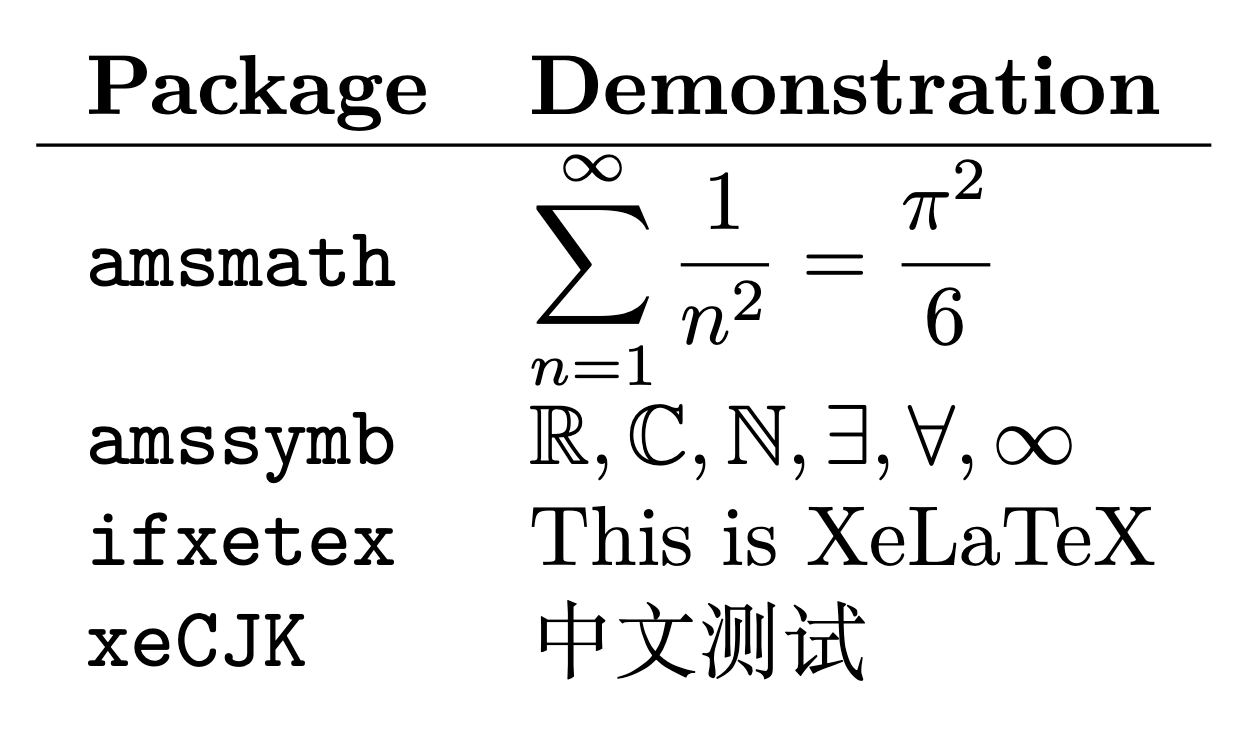
Please ensure both tests can compile successfully and produce the expected PDF output. This is a prerequisite for subsequent use of LaTeX in TexSlide. If you encounter any compilation errors, check and fix your LaTeX environment according to the error messages.
Learning Tutorials
For systematic learning of LaTeX, we recommend the following tutorials: