TexSlide 0.9.5 Release
TexSlide 0.9.5 is now available. This update introduces the built-in RaTeX compiler, formula enhancements, and multiple improvements to editing, export, and cross-platform experience.
Built-in RaTeX Compiler
This update adds a built-in RaTeX compiler. RaTeX is a pure Rust math rendering engine compatible with KaTeX syntax. It does not depend on JavaScript, WebView, or the DOM, which makes it suitable for native rendering and more consistent cross-platform behavior.
In TexSlide, besides continuing to support rendering through LaTeX or Typst, you can now also use the built-in RaTeX FFI integration for formula rendering. This reduces external environment dependencies and makes formula rendering faster in everyday use.
From a workflow perspective, RaTeX is better suited to quick editing and out-of-the-box usage. If you rely on the full LaTeX package ecosystem and deeper typesetting control, local LaTeX is still the better choice.
RaTeX vs. LaTeX
| Comparison | RaTeX | LaTeX |
|---|---|---|
| Environment dependency | Built into TexSlide and ready to use out of the box | Requires a local LaTeX installation and setup |
| Speed and use cases | Better suited to everyday editing and lightweight usage, with faster rendering | Better suited to academic typesetting, complex formulas, and deeper customization, but with higher startup and compilation overhead |
| Syntax and extensibility | Supports KaTeX-style macros, common math syntax, and features such as \ce and \pu | Supports a more complete LaTeX syntax and customization model, and can be extended further with \usepackage |
| CJK and fonts | Supports direct rendering of \text{你好こんにちは}, but currently does not support changing formula fonts or configuring CJK formula fonts separately | Usually requires font and CJK-related configuration, but provides more complete font control |
Compiler Experience Improvements
Beyond adding the built-in compiler, this update also improves the surrounding compiler workflow:
- Default compiler: Set the compiler used by default for new documents.
- Per-document setting: Assign a fixed compiler to each document. The setting is saved with the document, so other users opening it will use the same compiler automatically.
- Smart fallback: When opening a document, if its configured compiler is not available in the current environment, TexSlide will notify you and ask whether to switch to RaTeX.
- Status bar indication: The status bar now shows which compiler the current document is using.
These changes make compiler behavior more flexible across documents and more predictable when the runtime environment changes.
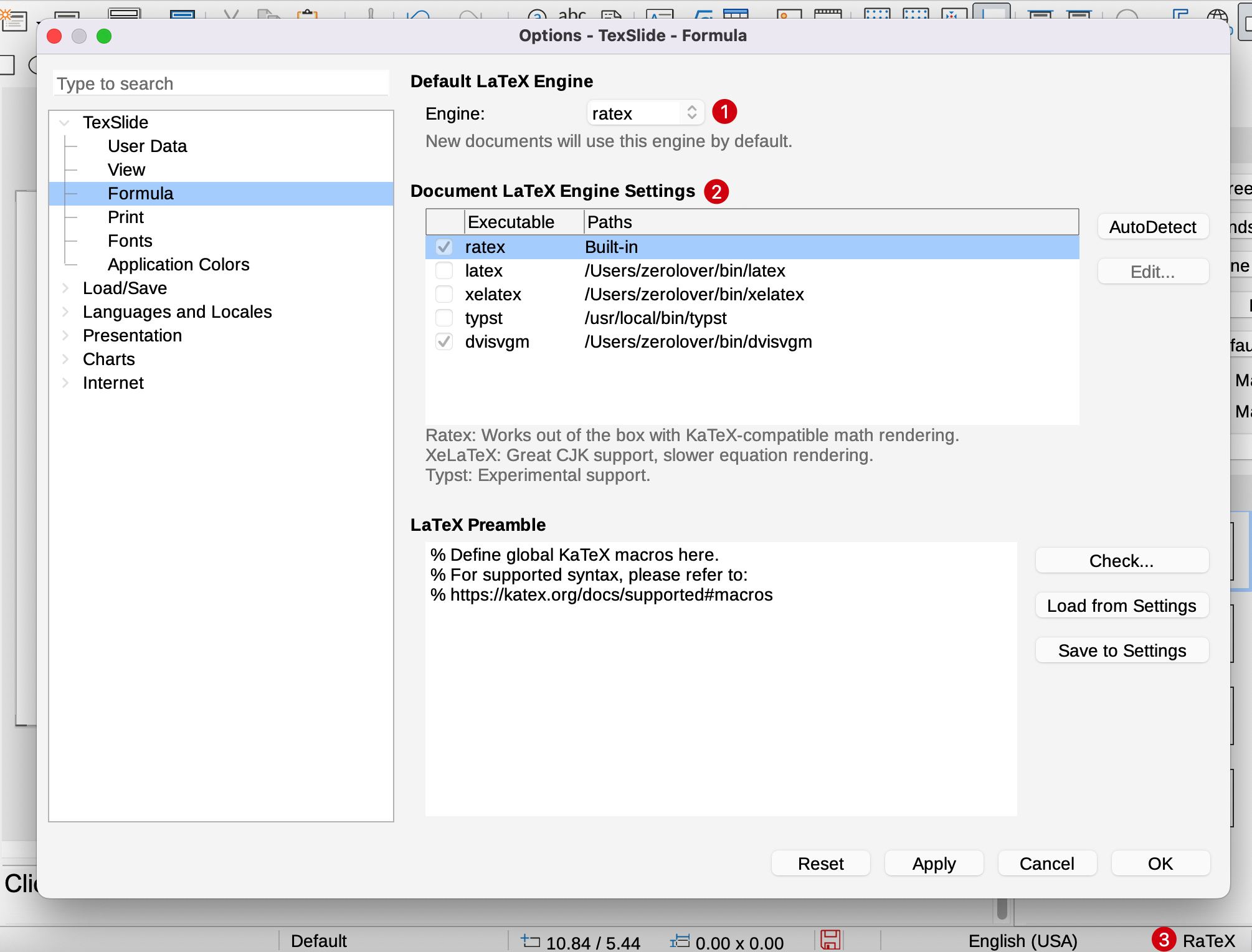
1. Set the default compiler 2. Assign a compiler per document 3. Show the current compiler in the status bar
Formula Enhancements
Display Formula Support
This update adds support for display formulas. Previously, TexSlide only supported the two inline formula forms $...$ and \(...\). It now also supports the display formula forms $$...$$ and \[...\].
Formulas written with $$...$$ or \[...\] are rendered in display style , so larger operators such as integrals and summations appear at a larger size, with limits placed above and below the symbol instead of inline.
Improved Nested Parsing
Parsing for text fragments inside formulas has been improved. Expressions such as $\text{price $p_1$ change}$ now render correctly, and the $p_1$ inside \text is recognized as an inline formula with a subscripted variable.
Clearer Free Quota Prompt
When the free formula quota is exhausted, formulas now render as Limit Reached, making the current state easier to identify.
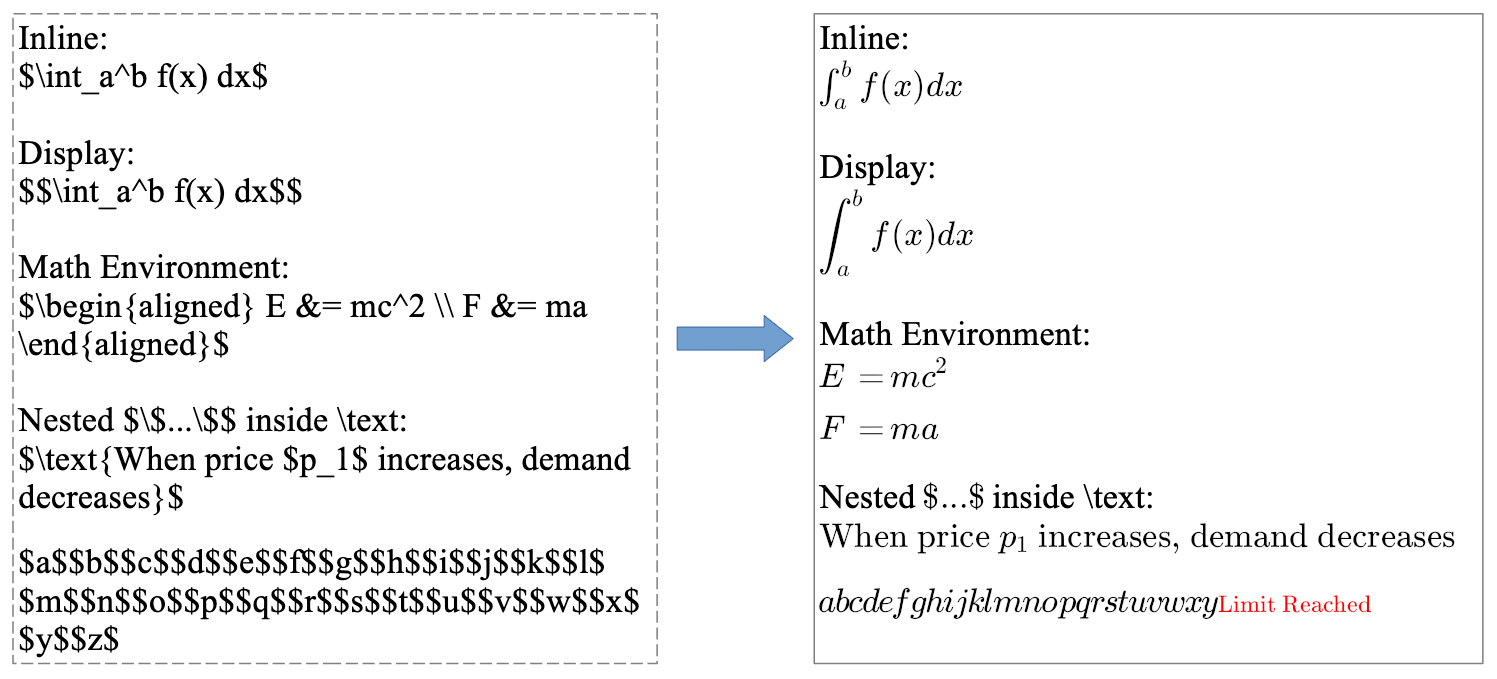
Display formulas, nested parsing, and free quota prompt
Editing Experience Improvements
This update improves object dragging and rotation, making it more direct to adjust the position and angle of shapes, text boxes, and other objects.
The main changes include:
- Rotation handles now appear as soon as an object is selected, so you can rotate it immediately without clicking again
- Hold
Shiftwhile rotating to constrain the angle in 15-degree steps - When the angle is close to
0°,90°,180°, or270°, releasing the mouse snaps it to the nearest right angle - Small objects are easier to drag directly, even when the pointer is close to a corner
- Drag hit testing for shapes and text boxes has been improved, especially when they are rotated
For presentations that require frequent fine adjustments to layout, position, and angle, these changes reduce accidental switching between dragging, resizing, and rotating.
Dragging and rotation interaction demo
Export Enhancements
TexSlide 0.9.5 adds support for exporting selected objects to PDF, which makes it easier to output a local part of the slide for reuse in other documents or workflows.
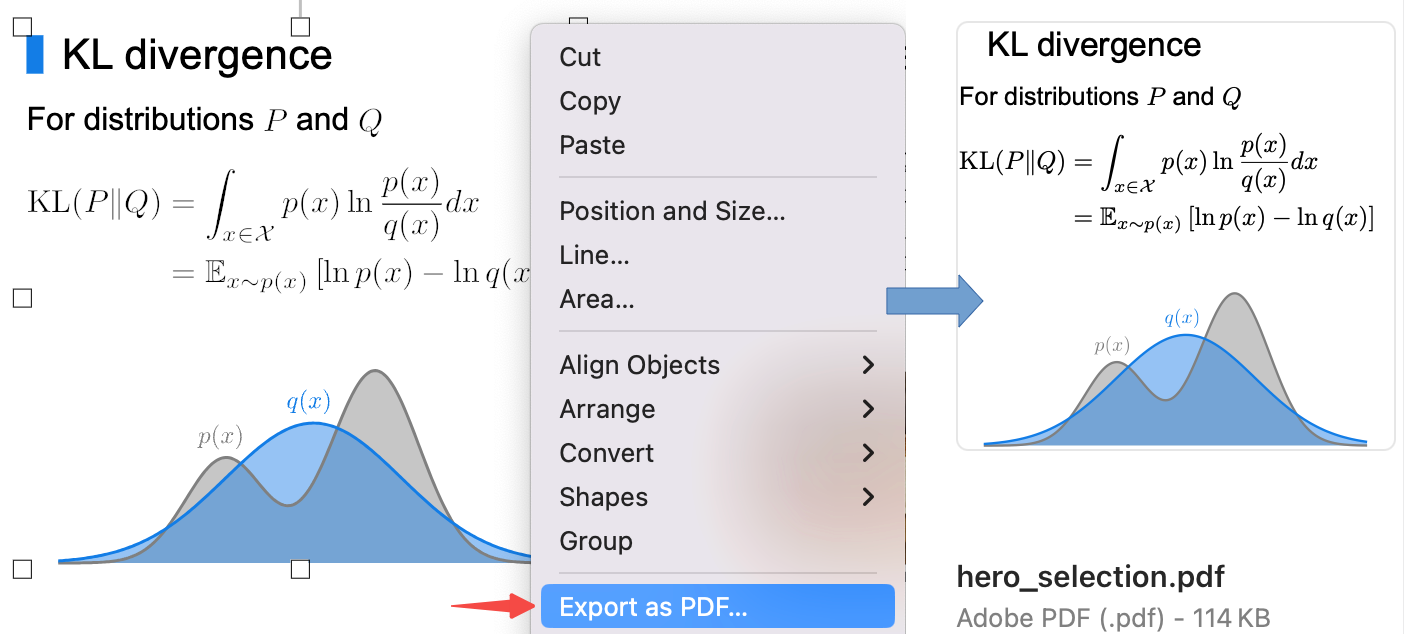
Export selected objects to PDF
This update also fixes incorrect export results for some curve shapes, improving consistency between what you edit and what gets exported.
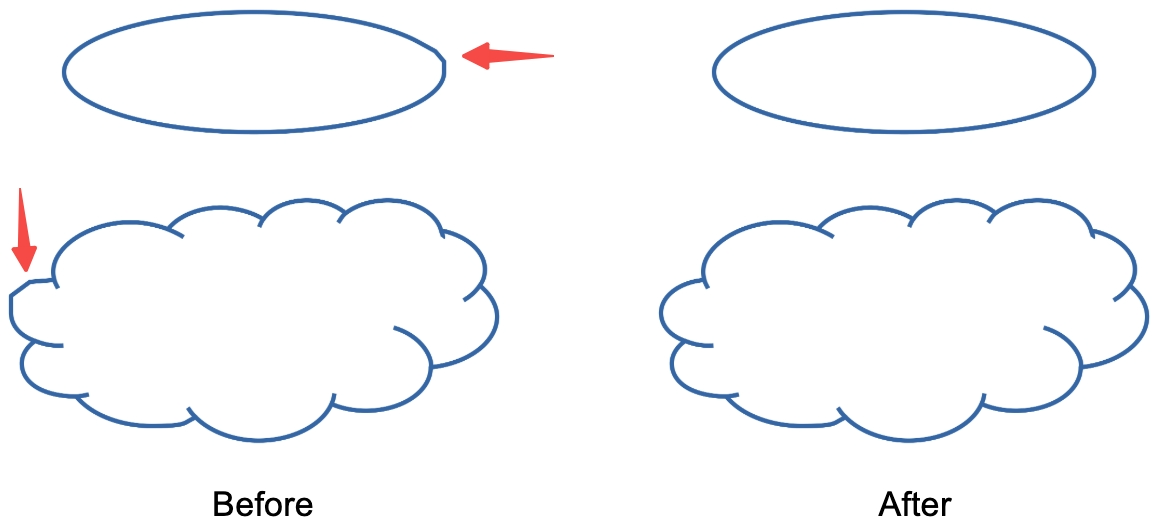
Fix for curve shape export results
Other Improvements and Fixes
Graphics and Display
Native RGBA image support has been added, along with display improvements for some import and rendering scenarios. This makes rendering more stable for image assets that include transparency.
Platform Experience
- macOS: Improved fullscreen and cursor behavior for smoother editing and presentation workflows
- Windows: Fixed display issues in some sidebar toolbars